
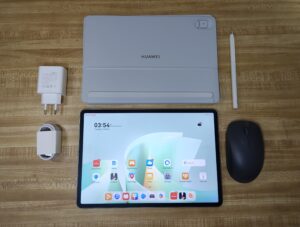
Upon unboxing, the tablet comes with accessories that complete the PC-like experience, including a smart magnetic keyboard, Huawei M-Pencil (3rd generation), and a Bluetooth mouse. It also includes access to the advanced WPS Office 3.0, which has a desktop-style interface.
The box also includes the usual paperwork, a 40W USB-C charging brick, and a USB-C to USB-C charging cable.
Screen and design
A personal favorite feature of the tablet is its 11.5-inch ultra-clear papermat liquid crystal display (LCD) with 2.8K resolution and sleek green back design.
For a reporter who works in a variety of settings, especially outdoors, the tablet's 2.8K LCD display remains reasonably visible even in bright sunlight conditions, thanks to its 1,000 nits maximum brightness.
The display also supports a 144Hz maximum refresh rate, making navigation—especially on the home screen—beautifully smooth.
For eye comfort, Huawei says the display has anti-glare and anti-reflection technology and reduces glare by up to 50%. Based on my usage, the display remained comfortable even during long periods of work.
As for the design, the tablet retains the sleek all-metal unibody of its predecessors. I appreciate its thin 6.1mm, 515g form factor, as it means I no longer have to lug around a bulky backpack for my usual work setup.
Battery and performance
Another major advantage of the Huawei MatePad 11.5 S 2026 is its battery performance. Its 8,800 mAh battery easily lasted more than a day with moderate use during my week of testing.
At the time of this writing, I used the device for four hours straight, and it only consumed 30% of the battery.
It also supports 40W SuperCharge, which allows the battery to be fully charged in about 85 minutes.
In terms of performance, the tablet is powered by the Kirin T92 SoC (hexa-core) and runs HarmonyOS 4.3. On paper, Huawei claims that the device is capable of seamless multitasking and can run MOBA (Multiplayer Online Battle Arena) games without overheating or massive performance degradation.
In real-life use, multitasking was very easy, especially for multimedia and productivity tasks, due to the device's ample RAM.
PC-level productivity
What Huawei aims to highlight on this device is its PC-level productivity, thanks to its inclusions right out of the box.
The smart magnetic keyboard, powered by Huawei NearLink for seamless connectivity, is moderately clicky and very responsive while typing. Its unique design allows the tablet to transform into different modes for different scenarios including laptop, split and studio form.
Meanwhile, the M-Pencil (3rd generation) supports 10,000+ levels of pressure sensitivity and promises ultra-low latency for a natural writing experience, also powered by NearLink.
In my experience, taking notes during meetings or coverage has never been more satisfying thanks to the PaperMate display, which, as the name suggests, mimics the texture of paper. It works best with Huawei Notes, which features AI handwriting enhancements and note replay.
For creative users, the pen is paired with the Go Paint app, which responds very well to the user's strokes and offers a suite of tools for sketching ideas.
final call
The Huawei MatePad 11.5 S 2026 is definitely a bang for your buck, especially when you take advantage of the introductory bundle.
The starting price for the 12GB + 256GB storage model of the MatePad 11.5 S 2026 is P29,999 (originally P31,999), plus free gifts worth P19,896 as part of the first sale bundle, available until March 22. The device is available on Huawei online store, Lazada and Shopee.
If you're someone who's always on the go, this tablet will probably fit into your workflow as well. — Age Adrian A Eva